

01 / WARN
A decision before the send.
Sensitive content triggers a warning. Cancel stops the submission; Continue opens an override confirmation before Proceed.
GHOSTBYTE / BEYOND THE HUNT
A closer look at the controls between sensitive information, AI applications and endpoint action.
01 / BROWSER AI GUARD
GhostByte inspects supported browser submissions against the configured policy. When sensitive text is found, the user gets a branded warning or block at the point of submission.
01 / WARN
Sensitive content triggers a warning. Cancel stops the submission; Continue opens an override confirmation before Proceed.
02 / BLOCK
The blocking policy stops the supported submission path. The user sees Submission blocked and a Return control.
03 / CONFIRM
After Continue on a warning, the confirmation shows Override confirmed / Submission allowed. Proceed completes the choice.
Original browser-extension artwork, unchanged. Interactive product preview; no AI message is sent.
Choose a screen to explore the user’s controls.
Managed policy can cover sensitive-data classifications, sanctioned applications, custom detectors and audit, warn or block mode.
The activity record distinguishes warnings, blocked submissions and overrides, with classification, policy, content-length and hash metadata.
Warning approval is tied to the reviewed input and policy. Changed content or policy is evaluated again before a supported submission is replayed.
Browser controls apply to supported adapters and inspected content. A browser decision describes that inspected path; it does not establish receipt by an AI provider.
02 / AI APPLICATION POLICY GATE
Connected applications can check prompts, responses, tool calls and retrieval intents against an authenticated, explicitly enabled policy gate.
Use the integration’s authenticated identity and authorized scope.
Inspect sensitive content and exact provider, model, tool and resource allowlists.
Match the decision to the exact intent, scope, policy and expiry.
The guarded caller invokes the operation only after an allowed decision.
Unknown tools and resources fail closed. A resource allowlist uses exact identifiers rather than a broad wildcard permission.
A prompt approval does not authorize arbitrary later tool calls or outputs. A response is evaluated as a separate intent.
The application gate refuses warning decisions pending a separate approval integration. The browser’s Continue control does not bypass this gate.
Applications must integrate the guarded caller and use its evaluated intent for the actual operation. Code that bypasses that integration is outside its scope.
03 / ENDPOINT RESPONSE
Queue authorized endpoint actions from the analyst workspace and retain the request, agent result and audit trail together.
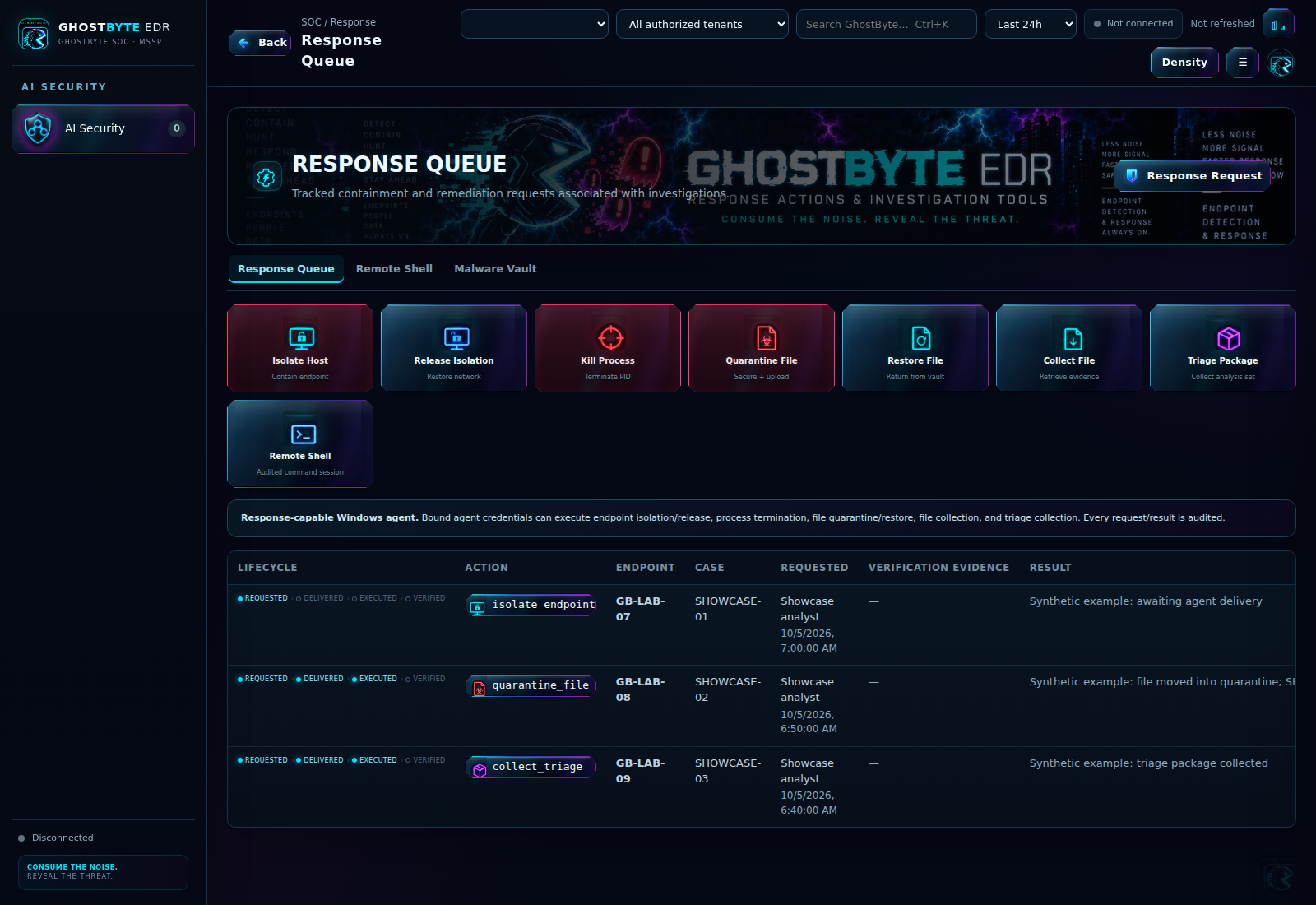
Supported Windows actions include isolate and release, terminate a process, quarantine a file and restore a quarantined file.
Collect a file or triage package. Quarantined samples link to the malware vault with server-calculated SHA-256 and audited access.
Delivery, execution and verification are distinct states. A queued request is kept separate from a completed action and its verification evidence.
Endpoint actions require a supported response-enabled Windows agent and a credential bound to that exact endpoint. The capture shows the interface with synthetic records; it is not a live endpoint operation.
Explore response capabilities ↗04 / MALWARE VAULT
Review collected and quarantined files alongside their originating endpoint, action and integrity metadata.
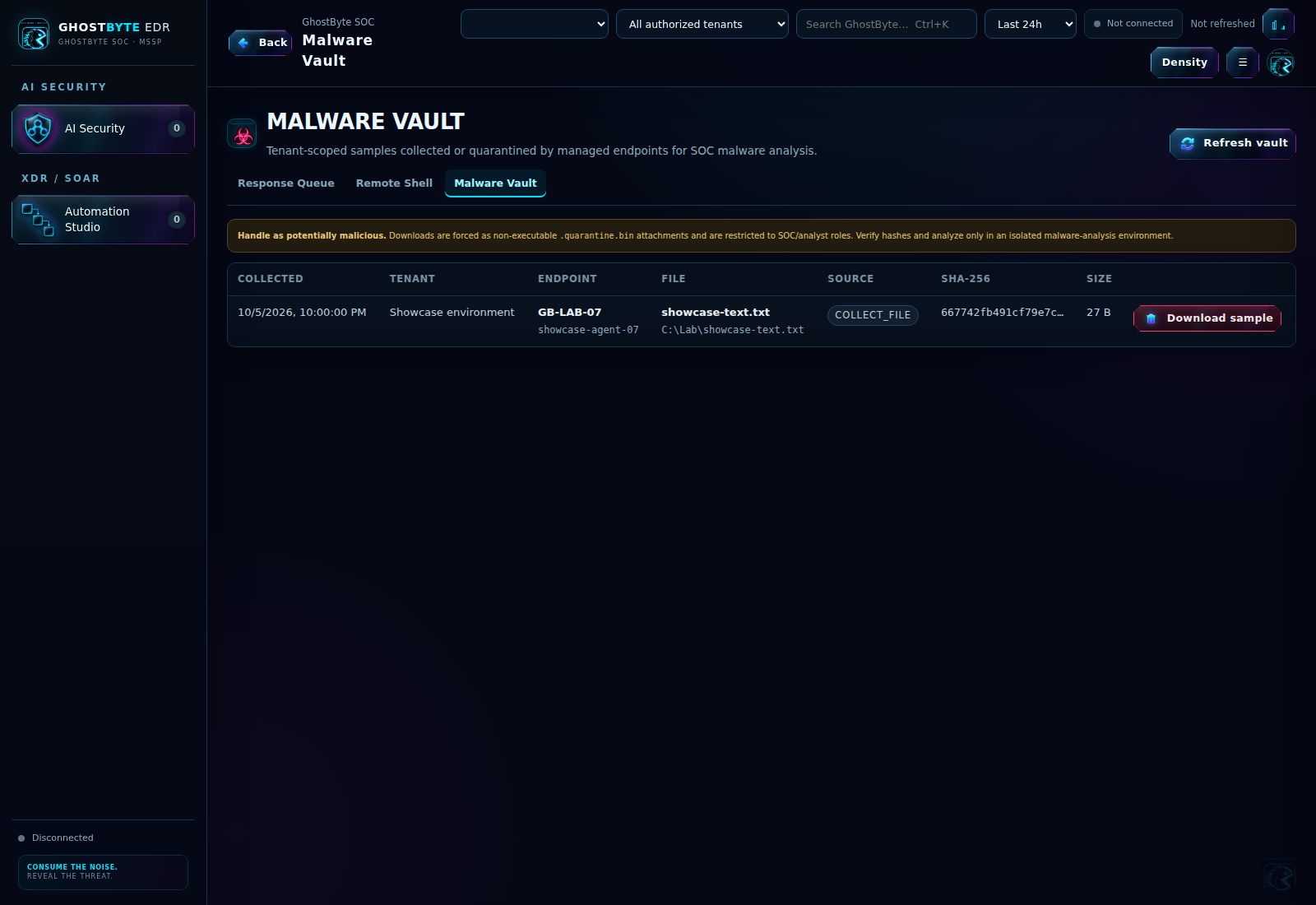
Collect a file without moving its original, or quarantine it through a supported endpoint action. The retained metadata records the source and original path.
The server calculates SHA-256 and rejects a supplied hash mismatch. Metadata retains customer scope, endpoint, action, size and upload time.
Authorized sample retrieval is audited. Vault content remains a potentially malicious artifact; a hash is an integrity identifier, not a safety verdict.
Illustrative record only. No sample is offered for download on this website.
GhostByte showcase sample. followed by a newlineApplication-layer vault encryption is implemented for new content; key management depends on deployment configuration. This showcase does not validate a production vault or execute a collection.
05 / AUDITED REMOTE SHELL
Discrete, queued PowerShell or command-shell requests on explicitly enabled Windows endpoints, with the command and returned result retained in the audit trail.
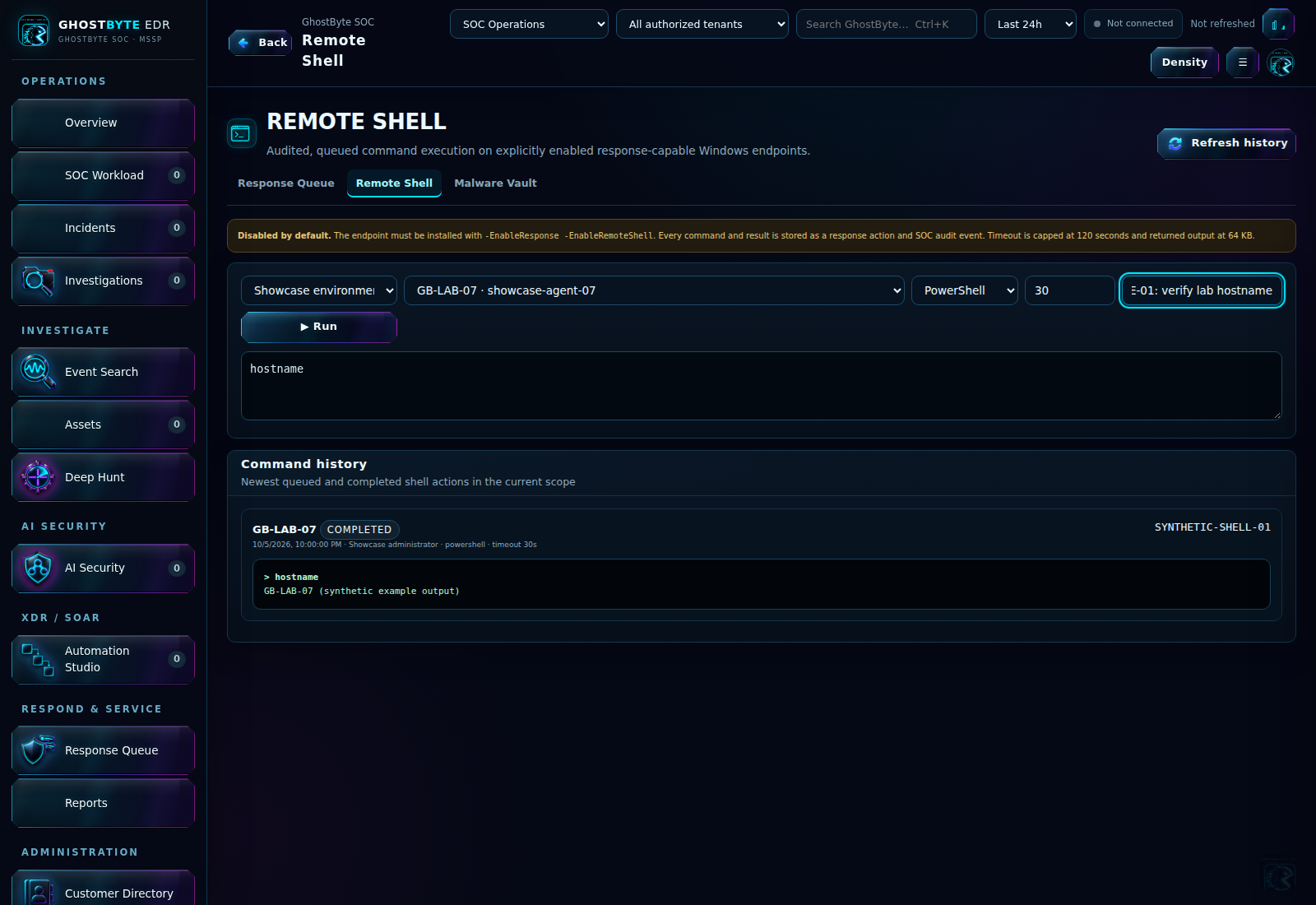
Remote Shell is disabled by default. The endpoint needs response and remote-shell enablement, a bound agent credential, and authorized administrative access.
Each command requires a reason or ticket/case reference. Requests and endpoint results are recorded in the SOC audit stream.
Requests have a timeout and an output limit. This is discrete command execution rather than an unrestricted interactive desktop session.
WEBSITE EXAMPLE / NO ENDPOINT CONNECTION
hostnameGB-LAB-07
This is synthetic output. In the product, review the actual request status and endpoint result in command history.
Website controls reveal an example only. They do not send a command, access an endpoint, or reproduce the product’s authorization checks.
06 / TRUST & ACCESS
Customer scope, granular permissions and retained audit evidence give operators context for authorized work.
Authorized scope constrains customer and descendant access. Investigation evidence and endpoint actions retain their customer context.
Analyst, engineering, management and administrative roles have different grants. Explicit deny permissions remain authoritative; role defaults are not a substitute for the effective permissions on a request.
Hash-chained audit records support checkpoint verification and startup tamper detection, with an optional HMAC integrity key. Integrity checks help detect changes to retained records; they do not establish that an operator’s decision was correct.
OIDC federation and SCIM user/group lifecycle are implemented integrations. New vault content uses authenticated application-layer encryption. Identity-provider setup, grants and key handling depend on deployment configuration.
These are implemented controls, not an independent certification claim. The website does not attest a particular deployment’s configuration.
See these controls in the analyst workflow ↗